Keyboard-first workspaces for macOS

Switch projects, not windows.

Give each project its own workspace. One keystroke brings its windows back where you left them, and reopens that project's

You're on the list. We'll write once, when Layout is out.

That didn't go through. Check the address and try again.

Launching soon. Free for 14 days, then $19 once. macOS 14+, Apple silicon.

  1. This is a workspace. Code keeps the editor on the left, the browser top right, and Claude stacked on a terminal below it.
  2. Hold ⌥ and press Tab. Your workspaces show up, most recent first. Let go to switch.
  3. Mobile opens another project, with Codex beside it. The Simulator floats over the zones, right where you put it.
  4. ⌃⌥3 jumps straight to Communication: Discord and Slack, side by side.
  5. Focus gives the same editor window the whole screen. Each workspace remembers where a window goes.
  6. ⌃⌥1, and Code is back as you left it. Nothing was minimized, nothing reloaded.

Real shortcuts: ⌃⌥1–4, or hover the screen and hold ⌥ Tab.

Step 1: Compose

Compose a layout for each kind of work

Start from a template, then make it yours. Split a zone right or down, drag a divider to the percent, and give each zone its apps.

Stacks
Several apps can share a zone. The one you focus comes to the front.
Floating apps
The Simulator can float over your zones, where you placed it, at the size you chose.
New windows
Pick the zone new windows join, or let them float where they open.
Spacing
One gap from 0 to 40 px, around the screen and between windows.
Cursor Editor 67%
Firefox Browser 33% × 50%
Terminal Terminal 33% × 50%

Drag a divider to resize. Proportions are saved for this workspace.

Switching from the Code workspace to Mobile takes Claude, Codex, Slack and Cursor from acme-web to acme-app.
  • Claudeacme-webOrders table flashes on load
  • Codexacme-webPaginate the orders API
  • SlackwebAcme
  • Cursoracme-web~/code

Step 2: Context

Your apps switch with you

Claude, Codex and Slack show every project in one window. Give each workspace its project and channel: when you switch to it, Claude and Codex bring back that project's latest chat, and Slack goes to that channel.

Press Control Option Shift 1 and every app opens in its zone, on the folder, tabs, chat, device or channel you chose.

Chats
Claude and Codex bring back the project's latest chat
Links
Any app with a URL scheme, like Slack, Discord, Linear or Notion
Folders
VS Code, Cursor and Terminal
Tabs
Safari, Chrome, Firefox, Arc, Brave and Edge
Simulator
A device, an installed app and a deep link

Layout opens things. It never runs a shell command, so your dev server has to be up for localhost to load.

Step 3: Switch

Switch in a keystroke

Windows from other workspaces move out of view and come back exactly where they were. Nothing is minimized, and nothing reloads.

  • Option TabBack to the previous workspace. Keep ⌥ held to pick another.
  • Control Option 1 to 9Go to workspace 1 to 9
  • Control Option Shift 1 to 9Open a workspace's apps and apply its layout
  • Command TabCycle this workspace's windows (optional)
  • Control Option SpaceCommand palette
  • Control Option OEvery workspace at a glance
  • Control Option SSave your desktop as a layout
  • Control Option ZUndo the last move or resize
  • Control Option FFloat the last window
  • Control Option RBring a window back on screen
  • Control Option Shift RRecover hidden windows
  • Control Option CommaOpen the Layout editor

Try them here: the keys light up as you press them.Every shortcut in the docs

Your keys, per keyboard

Remap any of them in Settings, down to each workspace's shortcut. Give each keyboard its own: ⌃⌥ on your MacBook, Hyper, thumb keys or F13 on your split keyboard. Layout goes by the keyboards you've connected, so QMK, ZMK and Karabiner setups just work.

Command palette
On the MacBook: Control Option Space
On the split keyboard: F13
Go to Code
On the MacBook: Control Option 1
On the split keyboard: Hyper C
Every workspace at a glance
On the MacBook: Control Option O
On the split keyboard: F14

Set it all up in one window

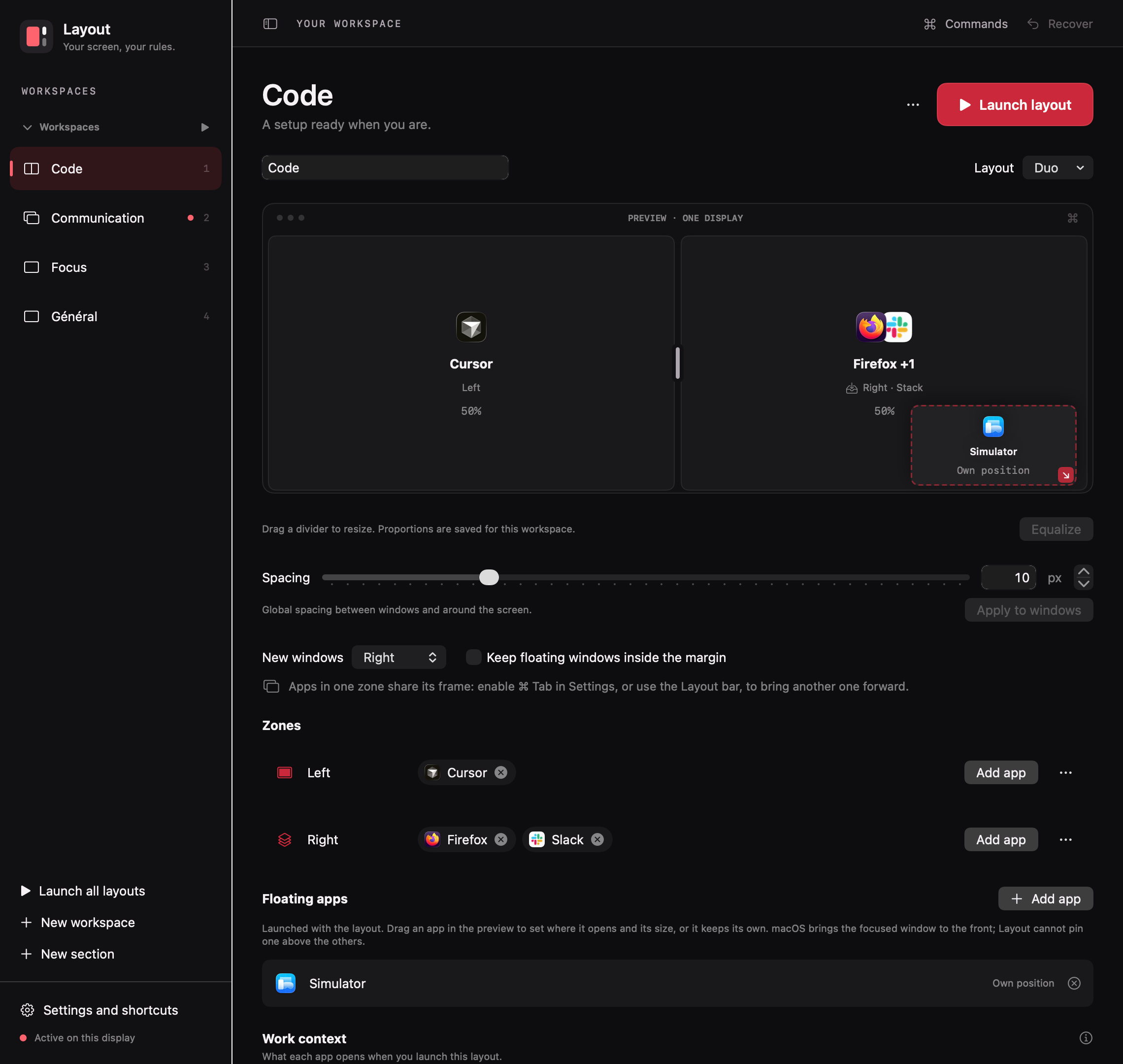
Workspaces on the left. On the right, the layout, its zones and floating apps, and what each app opens. While Layout is paused, you can set everything up before it moves a single window.

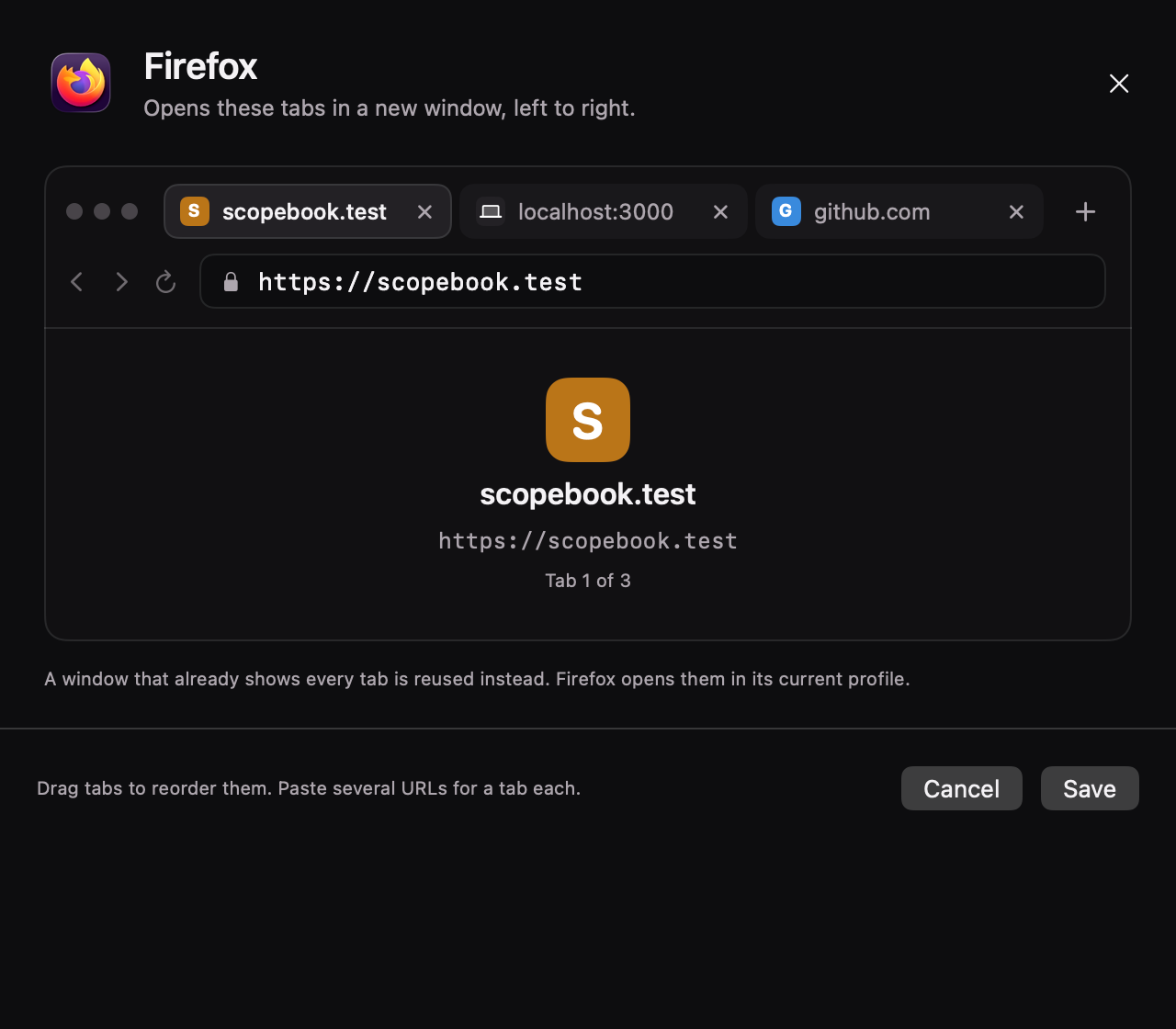
The Firefox work context dialog: three tabs, scopebook.test, localhost:3000 and github.com, in a browser-like editor with Cancel and Save buttons.
Browser tabs are edited like a browser: drag to reorder, paste several URLs at once.
The Layout editor showing the Code workspace: a Duo layout with Cursor on the left, Firefox and Slack stacked on the right, the Simulator floating, spacing set to 10 px, and the zones and floating apps lists.

Built so you never lose a window

Recover, anytime

Before a window leaves the screen, Layout writes it to a journal. Pausing or quitting puts every window back, and so does Control Option Shift R. After a crash, open Layout again and activate it: the windows come back before anything else.

Accessibility, and that's it

Layout moves windows with the Accessibility permission. It never asks for Screen Recording or Full Disk Access.

Stays on your Mac

No account, no telemetry. Your layouts live in ~/Library/Application Support/Layout.

Diagnostics you control

Export diagnostics writes a JSON file where you choose. Window titles become aliases unless you ask to include them.

Try it for 14 days. Then pay once.

Early access

$9.99instead of $19

One-time purchase, no subscription. The price goes up to $19 with Layout 1.0.

You're on the list. We'll write once, when Layout is out.

That didn't go through. Check the address and try again.

One email at launch, nothing else. The trial has every feature, and you don't need a card to start it.

  • Every feature, no tiers
  • Use it on up to 2 Macs
  • Free updates until 2.0
  • macOS 14 Sonoma or later, Apple silicon
  • One display for now

Questions

Everything else is in the documentation.

Does Layout work with more than one display?

Not yet: this version supports one display. If you connect a second one, Layout pauses, which brings back any windows it had moved out of view. Turn it back on once you're down to one display.

Can I keep AeroSpace running?

No. Two window managers would move the same windows, so quit AeroSpace first. Layout checks before it turns on.

Does it use macOS Spaces or full screen?

No. Layout's workspaces live on one desktop: windows from other workspaces are moved out of view instead of minimized, the way AeroSpace does it. Leave native full screen before you switch.

What happens to my windows if Layout crashes?

They come back. Layout keeps a journal of every window it moves out of view. Open Layout again and activate it: those windows come back first. While it's paused, choose Recover windows from the Layout icon in the menu bar.

Can each workspace have its own Claude chat or Slack channel?

Yes. Give a workspace a project and a Slack channel. Switching to it brings back that project's latest chat in Claude or Codex and opens the channel in Slack, in the window you already have. For Slack, paste the channel's Copy link address. Discord, Linear, Notion and other apps take a link in their own format instead, such as a discord:// link.

Does Layout start my dev server?

No. It opens folders, tabs and links, launches apps and boots simulators. It never runs a shell command, so localhost has to be running already.

Can I change the shortcuts?

Yes. Remap Layout's shortcuts in Settings, down to each workspace's own. Function keys work on their own, so a spare key can open the command palette.

Does it work with a split or programmable keyboard?

Yes. Each keyboard can have its own shortcuts: keep ⌃⌥ on your MacBook and give your split keyboard Hyper, thumb keys or F13. Layout goes by the keyboards you've connected, so QMK, ZMK and Karabiner setups work as they are. With two keyboards connected, both sets work.

Is it a subscription?

No. It's $19 once, after a 14-day free trial with every feature.

Switch projects, not windows.

Layout is launching soon. Leave your email for a single message on launch day.

You're on the list. We'll write once, when Layout is out.

That didn't go through. Check the address and try again.

$19 once · 14-day trial · macOS 14+